What Is Claude AI? The Ultimate Guide to Anthropic’s Powerful AI (2026)What is Claude AI, and why do so many businesses and individuals now rely on it every day? If you’ve spent any time researching AI assistants, you’ve likely come across Claude AI as one of the leading names alongside better-known chatbots. Built by Anthropic, an AI safety-focused research company, it has quickly become a go-to tool for writing, coding, research, and everyday productivity.
In this guide, we’ll answer what is Claude AI in plain language, break down how the Claude AI chatbot actually works, walk through its models and features, and look at where it fits compared to other AI tools.
What Is Claude AI?
So, what is Claude AI at its core? It’s a family of large language models — and the AI assistant built on top of them — developed by Anthropic. Like other modern AI chatbots, it’s trained on huge amounts of text so it can understand natural language, reason through problems, write content, generate code, and hold detailed conversations.
What sets the Claude AI chatbot apart is Anthropic’s emphasis on safety and reliability. It’s trained using a technique called Constitutional AI, which guides the model’s behavior according to a written set of principles rather than relying purely on trial-and-error human feedback. The goal is an assistant that’s genuinely helpful while staying honest about its own limitations.
You can access it in a few different ways:
- Claude.ai — the web, desktop, and mobile chat interface for individuals and teams.
- Claude Developer Platform / API — for developers who want to build it into their own products.
- Third-party platforms — it’s also available through cloud providers and partner apps.
Who Built It? Meet Anthropic
Anthropic Claude gets its name directly from its creator. Anthropic is an AI research and safety company founded by a team that previously worked on large-scale AI systems elsewhere. According to Anthropic’s own description of the company, its mission centers on ensuring that increasingly capable AI systems remain safe and beneficial as they grow more powerful — a philosophy that shapes everything from how the model is trained to how new features are released.
That safety-first approach is part of why Anthropic Claude is often described as a more cautious, dependable alternative among AI chatbots — designed to decline harmful requests, avoid confidently making things up, and stay transparent about its own limits.
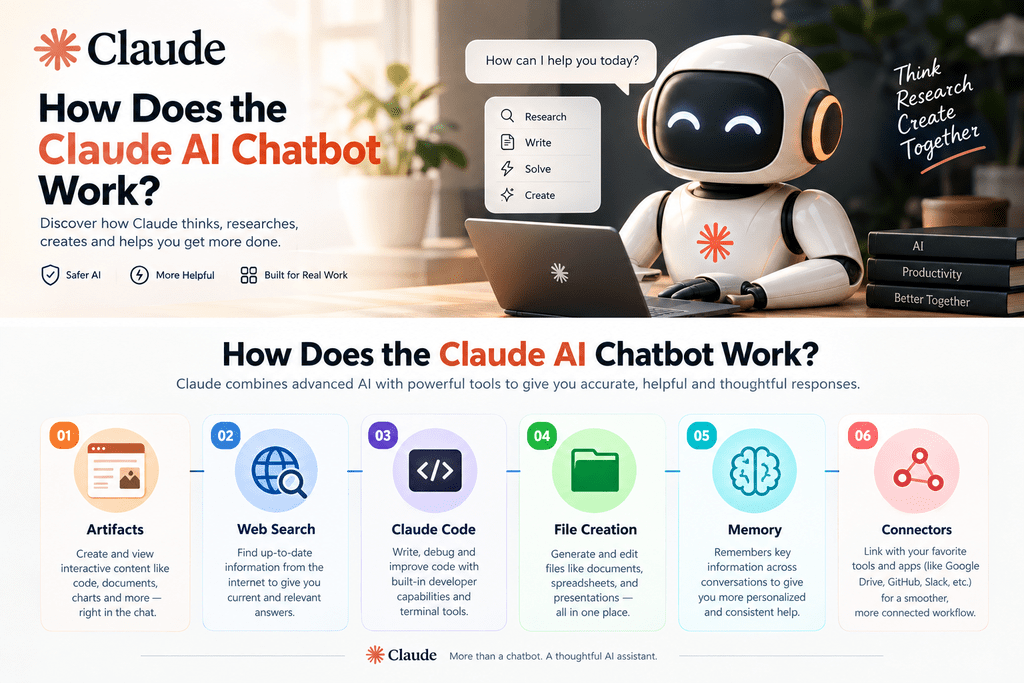
How Does the Claude AI Chatbot Work?
Show Image
Understanding how the Claude AI chatbot works helps explain why it feels so capable in conversation. At a high level, it’s a large language model: a neural network trained on enormous amounts of text so it can predict and generate coherent, relevant responses to whatever you type.
When you send it a message, it doesn’t look up a pre-written answer. Instead, it processes your entire conversation as context and generates a fresh response, word by word, based on patterns learned during training. This is what allows it to hold multi-turn conversations, remember earlier context within a chat, follow complex instructions, and adapt its tone depending on what you ask.
Modern versions go further than plain text generation. They can also use tools — searching the web for current information, running code, analyzing uploaded documents and images, and creating files like spreadsheets or slide decks — which turns Claude AI from a simple chatbot into a genuine productivity assistant.
Models Explained
One thing that often confuses newcomers is that “Claude AI” isn’t a single model — it’s a family of models, each built for different needs:
- Opus — the most capable model, built for complex reasoning, deep analysis, and the hardest problems.
- Sonnet — a balanced model that most people use day-to-day, combining strong performance with speed.
- Haiku — the fastest, most lightweight model, ideal for quick answers and high-volume tasks.
- Fable — part of Anthropic’s newer, top-tier model line, built for advanced use cases.
Anthropic updates this lineup regularly, so for the exact current models and version numbers, it’s worth checking Anthropic’s official models documentation directly rather than relying on any single article.
Claude AI Features You Should Know
Understanding what is Claude AI wouldn’t be complete without covering what it can actually do. Standout features include:
- Artifacts — generates standalone pieces of content — code, documents, or interactive components — in a separate window you can edit and reuse.
- Web Search — looks things up online rather than relying only on training data, which matters for anything time-sensitive.
- File and Document Creation — creates and edits real files, including Word documents, spreadsheets, and slide decks.
- Code Execution — writes and runs code, useful for data analysis, debugging, and building small tools on the fly.
- Memory — retains relevant context across conversations (when enabled), so you don’t have to re-explain your projects every time.
- Claude Code — an agentic coding tool that lets developers delegate coding tasks from the terminal or an IDE.
- Connectors and Integrations — connects to external tools like Google Workspace and Slack to work with your real data.
Together, these features move it well beyond a simple question-and-answer chatbot into a genuine assistant for both everyday tasks and professional work.
Real-World Uses
It’s already being used across a wide range of practical scenarios:
- Content Writing — drafting blog posts, marketing copy, emails, and reports.
- Coding — writing, reviewing, and debugging code across dozens of programming languages.
- Research and Summarization — digesting long documents, papers, and reports into clear summaries.
- Business Automation — powering AI-driven workflows that connect apps and handle repetitive tasks. If you’re exploring this for your own business, our AI Automation services can help you put tools like this to work inside your existing systems.
- Customer Support — powering chatbots that handle inquiries with natural, on-brand responses.
- Data Analysis — cleaning, analyzing, and visualizing spreadsheets and datasets.
- Marketing — AI increasingly supports digital marketing work like ad copy, campaign ideas, and content planning.
Claude AI vs. Other Chatbots
It’s natural to wonder how Anthropic Claude stacks up against other well-known AI chatbots. Rather than declaring one universally “best,” it’s more useful to look at what each tends to emphasize:
- Claude AI is often praised for longer, more nuanced writing, careful reasoning, and a cautious, safety-conscious approach to sensitive requests.
- Competing chatbots from other companies may offer different strengths, such as deeper integration with a specific ecosystem, native image generation, or different pricing tiers.
The right choice usually comes down to your specific use case — coding, writing, research, or day-to-day productivity — rather than one tool being definitively better in every scenario.
Key Benefits
There are several reasons it has grown so quickly in popularity:
- Strong Writing Quality — well regarded for producing natural, well-structured text.
- Safety-Focused Design — Anthropic’s Constitutional AI approach keeps it transparent and cautious rather than simply agreeable.
- Developer-Friendly — the Claude API and Claude Code make it straightforward to build into custom tools and workflows.
- Multiple Access Points — through Claude.ai, mobile apps, or third-party integrations, there’s a way to use it that fits most workflows.
- Regularly Updated Models — Anthropic frequently releases improved versions, so its capabilities keep expanding over time.
Limitations to Keep in Mind
No AI tool is perfect, and understanding it honestly means acknowledging its limits too:
- Knowledge Cutoffs — training data has a cutoff date, though features like web search help bridge that gap for current events.
- Occasional Mistakes — like all large language models, it can occasionally get facts wrong, so it’s worth double-checking anything critical.
- No Native Image Generation — primarily text- and document-focused rather than built around generating original images.
- Usage Limits — free plans come with usage limits, and heavier users will likely need a paid plan; check Anthropic’s official pricing page for current details.
Frequently Asked Questions
What is Claude AI used for? It’s used for writing, coding, research, summarization, data analysis, and business automation — essentially any task that benefits from a capable AI assistant.
Is it free to use? Yes, Anthropic offers a free version with usage limits, alongside paid plans for individuals, teams, and enterprises with higher limits and additional features.
Is it safe to use? It’s built by Anthropic specifically around AI safety research, using techniques like Constitutional AI to keep its behavior honest, transparent, and resistant to misuse.
Can it write code? Yes. It can write, explain, debug, and review code across many programming languages, and Claude Code extends this into a full agentic coding tool for developers.
Do I need technical skills to use it? No. It’s designed for natural conversation — you can use it productively through plain, everyday language with no coding background required.
Conclusion
So, what is Claude AI in simple terms? It’s an AI assistant — and the family of models behind it — built by Anthropic to help with writing, coding, research, and everyday productivity, with a strong emphasis on safety and reliability. From its Constitutional AI training approach to features like Artifacts, web search, and Claude Code, Anthropic Claude has grown into one of the most capable AI chatbots available today.
If you’re curious about bringing Claude AI or similar tools into your own business — whether for automation, marketing, or customer support — get in touch and let’s talk about the right approach for your workflow.