AI video is changing the way businesses, creators, marketers, educators, and entrepreneurs produce video content. Instead of spending hours writing scripts, searching for footage, recording every scene, and editing everything manually, modern AI tools can help turn an idea into a polished video much faster. AI video makes content creation faster and easier by helping with scripts, visuals, voiceovers, editing, captions, and even complete video production.
For businesses that depend on online visibility, this technology can be especially valuable. Video is now an important part of social media marketing, advertising, education, product promotion, YouTube content, and brand communication. When combined with a clear strategy and human creativity, AI video can help small businesses and individual creators produce more content without requiring a large production team.
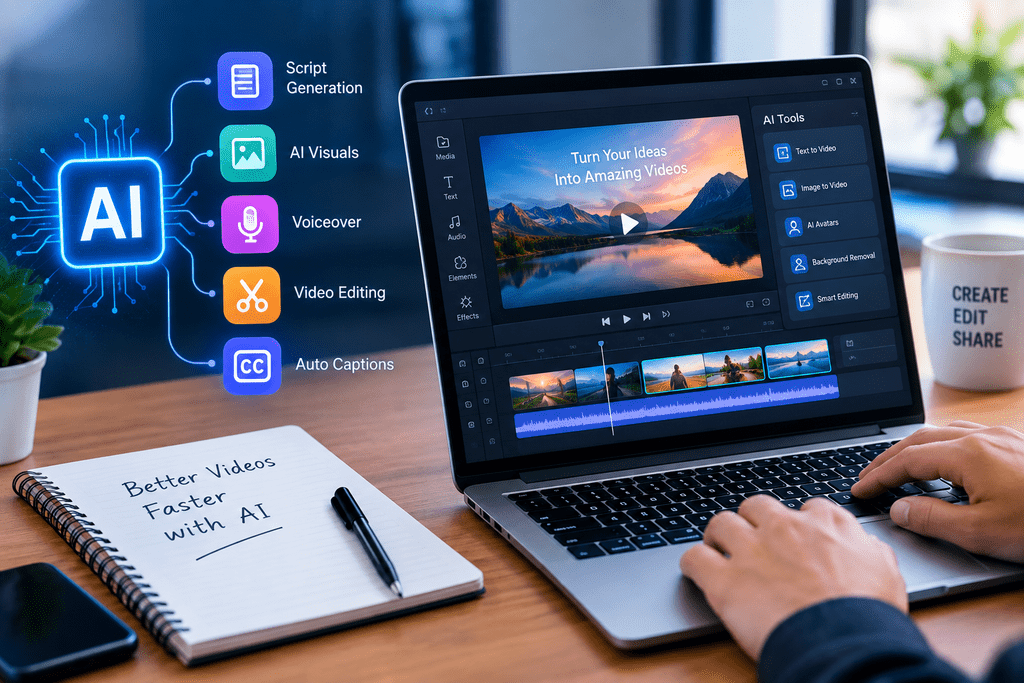
ai video
What Is AI Video?
Depending on the platform, an AI video generator may turn a written prompt into a video, create scenes from a script, generate an AI voiceover, add subtitles, suggest background music, remove unwanted objects, or transform existing footage.
The technology can be useful for both beginners and experienced creators. A beginner can use AI to produce a simple promotional video without advanced editing knowledge, while a professional editor can use AI to automate repetitive tasks and spend more time on creative decisions.
AI video does not necessarily mean completely replacing human creators. In many cases, the best results come from combining artificial intelligence with human planning, editing, fact-checking, storytelling, and brand direction.
How AI Video Technology Works
AI video systems use machine learning and generative AI models to understand instructions and produce or modify visual content.
A typical workflow may begin with a text prompt. The user describes the desired subject, style, audience, duration, and message. The system then interprets the instructions and generates scenes, images, animations, or other video elements.
Some tools work from text-to-video prompts. Others can transform images into moving scenes. Some platforms focus on AI avatars and presentations, while others are designed primarily for editing existing footage.
A simple AI video workflow can look like this:
Idea → Script → Visuals → Voice → Editing → Captions → Final Video
AI can assist at almost every stage.
For example, a business owner could provide a short description of a new service. AI could help turn that description into a video script, suggest scenes, generate supporting visuals, create narration, add subtitles, and prepare a version suitable for social media.
The final result should still be reviewed by a human. AI-generated content can contain incorrect information, unnatural wording, visual inconsistencies, or details that do not match a company’s brand.
Why AI Video Is Becoming Popular
The biggest reason for the growth of AI video is the increasing demand for video content.
Businesses need videos for websites, advertisements, social media, product pages, presentations, tutorials, email campaigns, and online courses. Creators need regular content for platforms such as YouTube, Instagram, Facebook, TikTok, and LinkedIn.
Producing all of this manually can be expensive and time-consuming.
AI helps reduce the amount of repetitive work involved in production. A creator can generate an initial concept quickly and then spend more time improving the story and making the content genuinely useful.
This is particularly important for small businesses. A large company may have a dedicated video team, but a small business owner may have to handle marketing, sales, customer service, and content creation alone.
With the right AI video workflow, one person can produce content that previously required several different specialists.
Major Benefits of AI Video
1. Faster Content Production
One of the biggest advantages is speed.
Creating a traditional video can involve planning, filming, transferring files, editing, color correction, audio production, subtitles, thumbnails, and revisions. AI can automate or accelerate several of these tasks.
This allows marketers to test more ideas and publish content consistently.
2. Lower Production Costs
AI video tools can reduce the need for expensive equipment and large production teams.
A small business may not need a professional studio for every marketing video. For certain types of content, AI-generated visuals, voiceovers, avatars, and templates can provide a practical alternative.
However, cost savings should not come at the expense of quality. Important campaigns may still benefit from professional filming and human editors.
3. Easier Video Creation
Many AI video platforms are designed for users who do not have advanced editing skills.
Instead of learning complicated editing software, users can describe what they want and then adjust the generated result.
This makes video marketing more accessible to entrepreneurs, freelancers, teachers, and small businesses.
4. More Content Ideas
AI can help generate video concepts, hooks, scripts, headlines, scene ideas, and calls to action.
For example, one blog post could become several short videos, a YouTube script, a product explainer, and a social media advertisement.
This content repurposing approach can significantly improve marketing efficiency.
5. Personalization
AI can make it easier to create different versions of a video for different audiences.
A company could create one version for beginners, another for professionals, and another focused on a specific industry.
Personalized video content can make marketing messages more relevant without requiring every version to be produced completely from scratch.
Best Uses of AI Video for Businesses
AI video has many practical business applications.
Promotional Videos
Businesses can create short videos explaining their products, services, offers, or brand story.
A simple promotional video might introduce a problem, explain the solution, show the product, and finish with a clear call to action.
Explainer Videos
Complex services can be difficult to explain through text alone.
AI video can help transform technical concepts into visual explanations. This can be particularly useful for software companies, agencies, online services, and technology businesses.
Training Videos
Companies can use AI video for employee onboarding, software tutorials, safety instructions, internal training, and educational resources.
Once a reusable production process is established, updating training materials can become easier.
Customer Support
Short instructional videos can answer common customer questions.
For example, an e-commerce business can create videos explaining how to place an order, track a delivery, use a product, or request support.
Presentations
AI video can also transform ordinary presentations into more engaging visual experiences.
Businesses can combine text, graphics, narration, animations, and charts to communicate information more effectively.
AI Video for Social Media Marketing
Social media is one of the strongest applications for AI video.
Platforms increasingly favor engaging visual content, while audiences expect brands to publish regularly. AI helps marketers maintain a consistent publishing schedule.
A single topic can be turned into multiple formats.
For example, a business writing about digital marketing could create:
- A 60-second educational video
- A short social media reel
- A product-related video
- A customer FAQ video
- A motivational business video
- A longer YouTube explanation
The important point is not to publish identical content everywhere. Each platform has different audience expectations, video dimensions, lengths, and communication styles.
For social media, the opening seconds are especially important. A strong hook can encourage viewers to continue watching.
Instead of starting with a generic introduction, begin with a problem, question, surprising fact, or clear benefit.
AI Video for YouTube
YouTube creators can use AI throughout the content production process.
AI can assist with topic research, video outlines, scripts, titles, descriptions, captions, voiceovers, and editing. However, creators should not rely on AI to produce generic videos without adding original value.
Successful YouTube content usually requires a strong combination of:
- A clear audience
- A useful topic
- Strong storytelling
- Good audio
- Engaging visuals
- A compelling title
- A relevant thumbnail
- Accurate information
- Consistent publishing
AI can accelerate these processes, but the creator remains responsible for the quality and usefulness of the final video.
For websites that publish video-related content, it is also worth following Google’s video and image best practices so search engines can understand the content properly.
AI Video for Product Marketing
Product demonstrations are another excellent use case.
An online store can create short videos showing how a product works, what problem it solves, and why customers should consider it.
For example, instead of showing only product photographs, an e-commerce brand could create a short demonstration video explaining the product’s features.
AI can help generate scripts and supporting scenes, but product claims should always be checked carefully.
Never allow an AI-generated video to show features, specifications, prices, or results that the actual product does not provide.
Accuracy is more important than visual quality.
AI Video for Education and Training
Teachers, trainers, coaches, and course creators can use AI video to make educational content more engaging.
A written lesson can be transformed into a narrated presentation with supporting visuals.
For example, an instructor teaching digital marketing could create separate videos explaining SEO, keyword research, content marketing, social media, email marketing, and analytics.
AI avatars and synthetic voice technology can also help create consistent instructional content. However, educators should make sure the presentation remains natural and easy to understand.
The goal should be better learning, not simply more automation.
How to Create an AI Video
Creating an AI video can be broken into several simple steps.
Step 1: Define the Goal
Before opening an AI tool, determine what the video needs to achieve.
Are you trying to generate leads, educate customers, promote a product, increase YouTube views, or build brand awareness?
A clear objective makes the rest of the process easier.
Step 2: Know Your Audience
A video for teenagers will look different from a video designed for business owners.
Consider the audience’s knowledge level, interests, problems, language, and preferred communication style.
Step 3: Write the Script
The script is the foundation of the video.
A useful structure is:
Hook → Problem → Solution → Benefits → Call to Action
Keep sentences natural and avoid unnecessary complexity.
Step 4: Create the Visual Plan
Decide what viewers should see while the narration is playing.
Use relevant visuals instead of adding random AI-generated scenes.
Step 5: Generate the Video
Enter your script, prompts, images, or other source material into the chosen AI video platform.
Review the first result carefully.
Do not expect the first generation to be perfect.
Step 6: Edit and Improve
Correct awkward transitions, pronunciation problems, visual errors, timing issues, and branding inconsistencies.
Add your logo, colors, fonts, captions, and other brand elements when appropriate.
Step 7: Optimize for the Platform
A YouTube video may require a different format from an Instagram Reel or TikTok video.
Check dimensions, duration, captions, thumbnail design, and other platform requirements before publishing.
Step 8: Review Before Publishing
Always check the final video for factual accuracy, copyright concerns, misleading claims, spelling errors, and technical problems.
Human review remains an important part of responsible AI video production.
Choosing the Right AI Video Tool
There is no single best AI video tool for every project.
Your choice should depend on what you actually need.
If you want text-to-video generation, look for a platform designed around generative scenes.
If you need AI presenters, choose an avatar-focused platform.
If you already have footage and want faster editing, look for AI-powered editing software.
If your main requirement is social media content, prioritize templates, captions, resizing, and fast publishing.
Before paying for a subscription, check:
- Export quality
- Video resolution
- Commercial usage rights
- Watermark policy
- Voice options
- Avatar quality
- Editing features
- Brand controls
- Pricing
- Storage limits
- Copyright and licensing terms
The cheapest tool is not always the best option. Choose the platform that fits your workflow and business objectives.
Common AI Video Mistakes to Avoid
Using AI Without a Strategy
Technology cannot fix an unclear marketing strategy.
Before creating videos, know why you are creating them and what action you want viewers to take.
Publishing Low-Quality Content
Producing more videos does not automatically produce better marketing.
A single useful video can be more valuable than ten generic videos.
Ignoring Human Editing
AI-generated content should be reviewed before publication.
Human editing helps improve tone, accuracy, storytelling, and brand consistency.
Using Misleading Visuals
Do not use AI-generated visuals that falsely represent a real product, customer, location, result, or event.
Trust is extremely important for businesses.
Ignoring Copyright
Always understand the commercial rights associated with images, music, voices, footage, avatars, and other assets used in an AI video.
Making Every Video Look the Same
AI templates can make production easy, but excessive repetition can make a brand look generic.
Use your own brand identity, storytelling style, examples, and creative direction.
AI Video and SEO
AI video can support an overall SEO and content marketing strategy, but simply adding a video does not guarantee higher rankings.
The surrounding page should provide useful, relevant information for the visitor.
Use a descriptive page title, clear headings, relevant text, descriptive image filenames, and useful alt text. Google recommends descriptive alt text that helps explain an image rather than stuffing keywords into it.
For this article, a suitable featured-image alt text would be:
Alt text: AI video creation using artificial intelligence tools
You can also use related keywords naturally throughout the article, including:
- AI video generator
- AI video tools
- AI video creation
- AI-generated video
- AI video editing
- text to video AI
- AI video marketing
- AI video maker
- video content creation
- artificial intelligence video
- AI content creation
- video marketing tools
Do not force every keyword into every paragraph. Search engines increasingly focus on whether content is genuinely helpful and relevant rather than whether a keyword has been repeated an arbitrary number of times. Google’s Search Essentials emphasize helpful, reliable, people-first content.
Internal linking can also help users and search engines discover related pages. Google recommends descriptive, crawlable links with useful anchor text.
For Riaz Dadu, this article can naturally link to related content such as the site’s AI Business Ideas article and Generative AI for Business guide.
The Future of AI Video
AI video technology is developing quickly.
Future tools are likely to make video production more automated, personalized, and interactive.
Instead of creating a video manually from start to finish, marketers may increasingly describe a campaign goal and allow AI systems to generate multiple creative variations.
For example, a business could provide its brand information, target audience, product details, and marketing objective. An AI system could then create several video concepts for testing.
AI may also make personalized video communication easier. Different customers could receive variations of a message based on their interests, purchase history, or stage in the customer journey.
Another important development will be better integration between AI video, marketing automation, analytics, and customer relationship management systems.
This could create a complete content workflow where businesses generate videos, distribute them, measure performance, and improve future content based on audience behavior.
However, human creativity will remain important.
The strongest brands will not simply use AI to generate more content. They will use AI to increase the quality, speed, relevance, and consistency of their communication.
Frequently Asked Questions About AI Video
What is AI video?
AI video is video content created, edited, enhanced, or transformed using artificial intelligence. AI can help with scripts, visuals, voiceovers, captions, animation, editing, and other parts of video production.
Can beginners create AI videos?
Yes. Many modern AI video tools are designed for beginners. You can start with a script or simple prompt and use templates or automated features to produce a video without advanced editing skills.
What is an AI video generator?
An AI video generator is software that uses artificial intelligence to create video content from prompts, scripts, images, or other inputs. Different platforms provide different capabilities.
Can AI video be used for business marketing?
Yes. Businesses can use AI video for advertisements, product demonstrations, social media posts, training, customer education, presentations, and promotional content.
Is AI video good for YouTube?
AI video can be useful for YouTube when it provides original, accurate, and valuable content. AI should be treated as a production assistant rather than a replacement for thoughtful content strategy.ement for thoughtful content strategy.
Does AI video replace human video editors?
Not necessarily. AI can automate many repetitive editing tasks, but human editors remain valuable for storytelling, creative direction, quality control, brand consistency, and complex productions.
How can AI video help small businesses?
AI can help small businesses produce professional-looking content with fewer resources. It can reduce production time and make it easier to maintain a consistent video marketing strategy.
Is AI-generated video SEO-friendly?
AI-generated video can be part of an SEO-friendly content strategy, but quality and usefulness remain essential. The page containing the video should also have relevant text, descriptive titles, appropriate metadata, and a good user experience.
Final Thoughts
AI video is becoming an important part of modern content creation. It gives businesses, marketers, creators, educators, and entrepreneurs new ways to produce visual content faster and more efficiently.
The real opportunity is not simply pressing a button and allowing AI to create everything.
The better approach is to combine artificial intelligence with human creativity.
Use AI to brainstorm ideas, develop scripts, generate visuals, speed up editing, create captions, and repurpose content. Then use human judgment to improve the story, verify the information, protect your brand, and make the final result genuinely useful.
For small businesses especially, this combination can create a powerful advantage. You do not need a large production studio to begin. Start with one clear goal, one audience, and one useful video format.
Experiment, measure the results, learn what your audience responds to, and improve your process.
The future of video creation will not simply belong to people who use the most AI tools. It will belong to people who know how to use AI video technology strategically to communicate better, serve their audience, and grow their business.