Learn how Claude AI automation for small business works in 2026 – real use cases, tools and setup steps to save time and grow sales.
Claude AI Automation for Small Business: Easy 2026 Guide
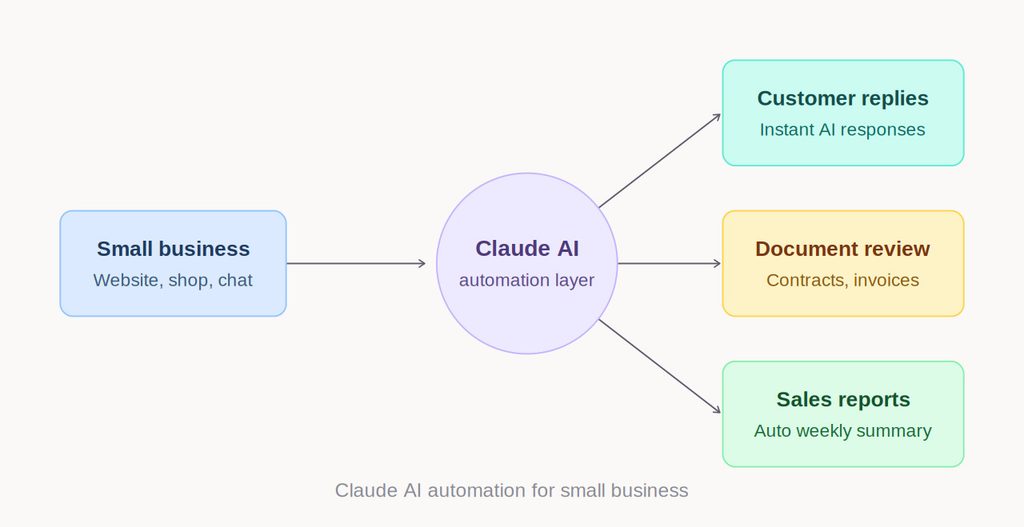
Claude AI automation for small business is one of the fastest, most practical ways a shop, agency, or local service company can compete with bigger businesses in 2026 – without hiring more staff. If you have heard the term “AI automation” and wondered what it actually does for a business your size, this guide breaks it down in plain language, with real examples you can act on this week.
What Is Claude AI Automation for Small Business?
Claude is Anthropic’s family of AI models, built to understand instructions, read documents, and generate accurate written work. On its own, Claude can read an email, summarize a long document, or draft a reply in your own tone. Connected to automation tools, it becomes something more useful: a system that reads information from one place and acts on it somewhere else, automatically.
That connected setup is what people mean by Claude AI automation for small business – not just “using AI” to answer questions, but wiring AI into the actual tools a business runs on, so repetitive work happens without a person doing it manually every time.
Why Small Businesses Need Claude AI Automation
Larger companies solve repetitive work by hiring more staff. Small businesses usually cannot, so tasks pile up: replying to every WhatsApp inquiry, updating stock counts, writing product descriptions, chasing invoices, posting on social media. This is exactly the workload that Claude AI automation for small business is designed to absorb.
Three reasons this matters right now:
1. Setup cost has dropped sharply. A few years ago, automating a workflow required a developer, a large budget, and weeks of build time. Today, Claude can be connected through automation platforms like n8n in a matter of days, at a fraction of the previous cost.
2. It does not require technical skill to operate. Once an automation is built, a business owner does not need to understand AI or write code – they just keep running the business while the system works in the background.
3. It compounds over time. Every hour saved on manual replies, data entry, or reporting is an hour that goes back into sales, service, or strategy – the parts of a business only a person can do well.
Real Use Cases of Claude AI Automation for Small Business
Rather than talking about AI in the abstract, here is what Claude AI automation for small business looks like when applied to actual daily operations.
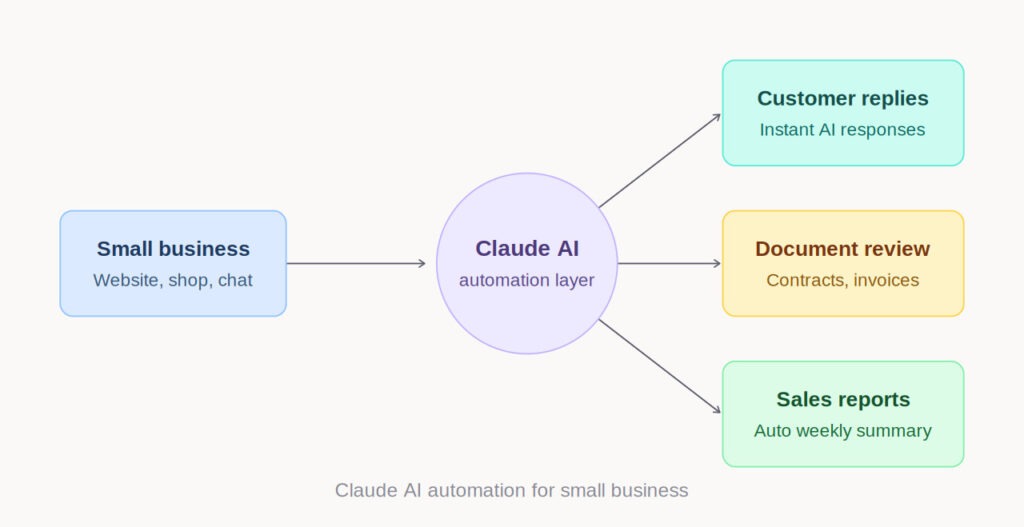
1. Automated Customer Replies A customer messages your Facebook page or WhatsApp asking about pricing, availability, or delivery times. Instead of a staff member replying manually every time, Claude can read the message, check your product or service data, and draft – or send – an accurate response instantly, even outside business hours.
2. Document and Contract Review Claude is particularly strong with long documents. A workflow can have it read incoming contracts, invoices, or supplier agreements and flag anything unusual – a price change, a missing clause, a deadline – before it reaches your desk.
3. Content and Marketing Drafts Writing product descriptions, ad copy, or social captions for every new item is one of the most time-consuming parts of running an online store. Claude can generate first drafts based on product details and brand tone, so your team edits instead of starting from a blank page.
4. Lead Qualification When a new inquiry arrives through your website contact form, an automated workflow can have Claude read the message, judge how ready-to-buy the lead is, and route it – hot leads go straight to your phone, general questions get an automatic first reply.
5. Reporting Without the Manual Work Instead of manually pulling numbers from Google Ads, Facebook Ads, and website analytics every week, a workflow can have Claude compile a plain-language summary and email it to you – no dashboards to check, no spreadsheets to build.
How Claude AI Automation for Small Business Gets Built
This is where n8n comes in. n8n is a workflow automation tool that connects Claude to the rest of your business software – your website, your CRM, your messaging apps, your spreadsheets. Think of Claude as the “brain” that understands and generates content, and n8n as the “nervous system” that moves information between tools and triggers actions automatically.
A typical build follows four steps:
- Identify the repetitive task. What are you or your staff doing manually, every day or every week, that follows a predictable pattern?
- Map the workflow. Where does the task start – a form submission, a new message, a scheduled time – and where does it need to end?
- Connect Claude through n8n. The platform pulls in relevant data, sends it to Claude’s API for processing, and delivers the result wherever it needs to go.
- Test, refine, and monitor. Early results get reviewed and adjusted until the system reliably does what a human would have done manually.
If you would rather have this built correctly the first time, our AI Automation service sets up Claude-powered workflows tailored to your existing tools – you can start a conversation here.
A Real Example: What This Looks Like in Practice
Picture a small clothing shop in Dhaka running Facebook ads and taking orders through WhatsApp. Before automation, the owner spent two to three hours every evening replying to the same pricing and delivery questions, manually reviewing supplier invoices, and updating a spreadsheet for next week’s ad budget. After setting up Claude AI automation for small business through n8n, most of those replies happen instantly, invoices get flagged automatically when something looks off, and a plain-language sales summary lands in the owner’s inbox every Sunday night. The owner’s actual work shifted from answering repetitive messages to closing the sales that came in through those automated replies – the same hours, spent on higher-value work.
This is the real promise of Claude AI automation for small business: not fewer people needed, but the same people spending their time where it actually grows the business, whether that is on ad strategy or on customers who need a real human conversation. To see how this fits your specific setup, visit our services page or read more about our approach.
Claude AI vs. Other AI Models for Small Business Automation
Business owners researching this space often ask which AI model is “better” for automation. The honest answer depends on what your business needs most.
- Claude’s advantage is accuracy on long, detailed documents and a writing style that reads naturally rather than robotically – useful for customer replies, contracts, and reports.
- Other AI models may integrate more tightly with a specific ecosystem, such as Google Workspace.
For a small business that handles a lot of written communication – contracts, detailed customer questions, reports – Claude AI automation for small business is usually the stronger fit because of how carefully it follows instructions on longer, more detailed content.
Common Mistakes to Avoid
Automating too much, too fast. Start with one workflow – usually customer replies or reporting – get it working reliably, then expand.
Removing the human entirely. The best automations use AI to handle the first draft or first response, with a human reviewing anything sensitive – pricing negotiations, complaints, high-value leads – before it goes out.
Ignoring the setup phase. An automation is only as good as the information it is given. If your product data, FAQs, or pricing sheets are outdated, Claude will confidently generate responses based on bad information. Clean data in means reliable automation out.
Getting Started This Month
You do not need a six-month roadmap to benefit from this. A realistic first step: pick the one task eating the most hours in your week, map out exactly what happens from start to finish, and build a single automated workflow around it. Once that is running reliably, the next workflow gets easier – and the one after that, easier still.
Final Thoughts
Claude AI automation for small business is not about replacing the people running the business – it is about removing the repetitive work that keeps them from focusing on growth. The businesses that adopt this early, in small, well-tested steps, are the ones that will spend 2026 working faster than their competitors instead of catching up to them.
Table of Contents
Frequently Asked Questions
Is Claude AI automation expensive for small businesses?
No – most small business automations built with Claude and n8n cost far less than hiring extra staff. Setup is typically a one-time cost, with only small ongoing platform fees afterward.
Do I need coding skills to use Claude AI automation?
No. Once an automation is built by a developer, the business owner just runs their business as normal – no coding or technical maintenance is required day to day.
How long does it take to set up Claude AI automation for a small business?
A single workflow – like automated customer replies or weekly reporting – usually takes a few days to build, test, and go live, depending on how many tools it connects to.
Can Claude AI automation work with WhatsApp and Facebook Messenger?
Yes. Claude can be connected through n8n to WhatsApp Business, Facebook Messenger, and most messaging platforms small businesses already use.