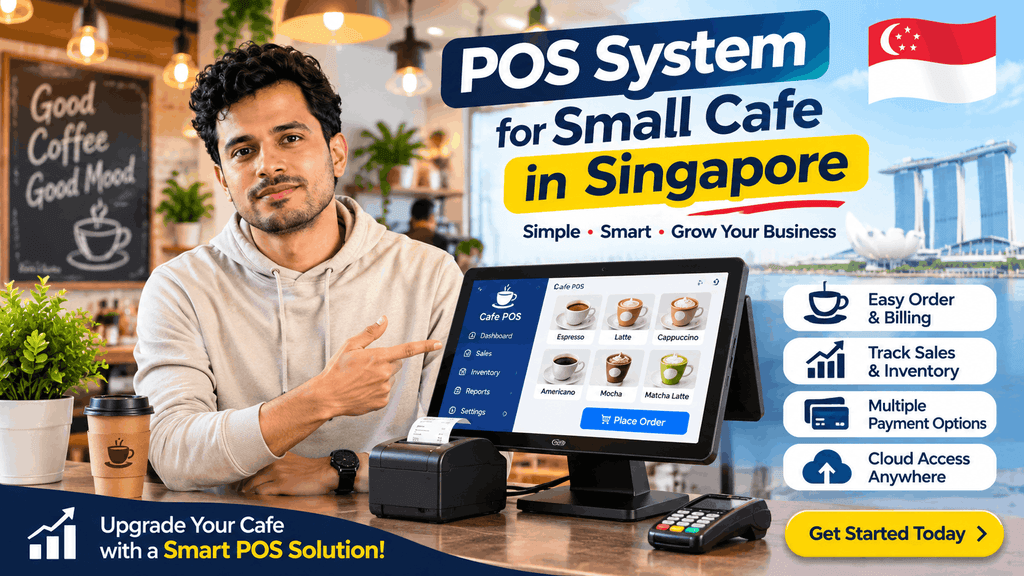
A POS system for small cafe Singapore owners is far more than a cash register: it takes orders, accepts PayNow and card payments, tracks stock and shows you what actually sells. In a city with high rents, tight margins and customers who expect fast service, the wrong system slows your morning rush, while the right one saves time every single day.
This guide explains what a cafe POS does, which features matter, what to check for Singapore specifically, what it costs, and when a custom-built system makes more sense than an off-the-shelf subscription. It’s written for cafe owners and managers, so each section opens with a straight answer you can skim. POS system for small cafe Singapore
Quick answer: The best POS system for a small cafe in Singapore is simple enough for staff to learn in an hour, fast during the rush, and works with PayNow, NETS and cards. It should handle GST, track inventory, run offline if the internet drops, and report on sales by item and hour. Most small cafes do well with a subscription POS. A custom POS makes sense when your workflow doesn’t fit standard software. POS system for small cafe Singapore
What is a POS system for a small cafe?
A cafe POS (point of sale) system is the software and hardware you use to take orders, collect payments and record sales. It usually includes a screen for staff, a receipt printer, a cash drawer and a card or QR payment device. Behind the scenes, it keeps your menu, prices, stock and sales reports in one place. POS system for small cafe Singapore
For a small cafe, a good POS replaces paper dockets, manual till counts and end-of-day spreadsheets. It also gives you numbers you can act on, such as your best-selling drink or your slowest hour. POS system for small cafe Singapore
Why does a small cafe in Singapore need a proper POS system?
Singapore is a competitive cafe market, and small mistakes cost real money. A proper POS helps in five areas:
- Speed at peak times. Common problems at rush hour include piled-up order tickets, slow payments and wrong customisations. A cafe-ready POS cuts these with clear order screens and quick payment.
- Accuracy. Orders go straight to the barista or kitchen, so fewer drinks are made wrong.
- GST and records. If you’re GST-registered, your system should apply and report GST correctly, which makes bookkeeping and filing easier.
- Customer loyalty. Built-in loyalty or points programmes give regulars a reason to come back instead of trying the new cafe down the road.
- Smarter decisions. Sales reports show which items earn a profit, when to schedule more staff and what to drop from the menu. POS system for small cafe Singapore
Which features should a cafe POS system have?
Here is a practical checklist. Treat the first eight as essentials and the rest as upgrades as you grow.
- Fast, simple order entry with large buttons for drinks, food and modifiers such as oat milk, extra shot or no sugar.
- Local payment support for PayNow, NETS, major cards and popular e-wallets.
- GST handling with correct receipts and reports.
- Offline mode so you can keep selling if the internet drops.
- Menu and price management you can edit yourself, without calling a developer.
- Sales reports by item, hour, day and staff member.
- Staff logins and permissions so only managers can refund or change prices.
- Receipt and kitchen or bar printing that matches how your cafe works.
- Inventory tracking for beans, milk, pastries and packaging, with low-stock alerts.
- Table or queue management if you offer table service or a pickup counter.
- Loyalty and promo codes to bring customers back.
- QR ordering and delivery integration if you want customers to order from their phones or sell through delivery apps.
Don’t pay for features you won’t use. A ten-seat coffee bar needs a different system from a 60-seat cafe with a kitchen. POS system for small cafe Singapore
What Singapore-specific things should you check?
Singapore has a few local details that generic overseas software can miss. Before you commit, confirm that the POS:
- Supports PayNow, NETS and common e-wallets, not just cards. Local customers expect them.
- Handles GST correctly. The rate is currently 9%, but check the latest rules with IRAS and ask your accountant what records you need.
- Connects to accounting software so sales flow into your books without retyping.
- Works with delivery platforms if you sell through them, so orders don’t need to be keyed in twice.
- Offers local support in your time zone, so you’re not stuck waiting during a Saturday brunch rush.
- Prints clear, compliant receipts with the details your business needs to show.
Also keep your online presence in sync. Your opening hours, menu and location on your Google Business Profile should match what your POS and website say. Google explains that local results are mainly based on relevance, distance and prominence, so accurate details help customers find you. POS system for small cafe Singapore
What types of POS systems can a small cafe use?
There are four common options:
- Cloud-based POS on a tablet. Runs on an iPad or Android tablet, with a monthly fee. Quick to set up and popular with small cafes.
- Traditional terminal POS. A dedicated machine with a screen, printer and drawer. Sturdy, but often pricier and less flexible.
- Mobile or handheld POS. Staff take orders and payments at the table or in the queue. Good for busy outdoor seating and events.
- Custom-built POS. Software built around your exact workflow, menu and reporting. More upfront work, but no forced compromises. POS system for small cafe Singapore
Should you choose an off-the-shelf POS or a custom POS?
For most small cafes, an off-the-shelf subscription POS is the right choice. It’s fast to start, supported by the provider and has the standard features built in. A custom POS is worth considering only in specific situations. POS system for small cafe Singapore
Choose an off-the-shelf POS if:
- You run one outlet with a standard menu and workflow.
- You want to be selling within days.
- You prefer a predictable monthly fee and provider support.
- You don’t need unusual reports or integrations. POS system for small cafe Singapore
Consider a custom POS if:
- Your workflow doesn’t fit standard software, for example a cafe with a bakery, retail corner, catering orders and workshop bookings in one system.
- You need special reports, pricing rules or staff commission logic.
- You want to connect your POS to your own website, ordering page or internal tools.
- You’re planning several outlets and want one system you control.
- Monthly fees across many outlets now cost more than a one-time build.
A custom system takes longer to launch and needs a reliable developer for updates. If you’re not sure, start with a subscription and plan a custom build once you know exactly what you need. POS system for small cafe Singapore
How much does a POS system for a small cafe cost in Singapore?
Published starting prices for cafe-friendly POS software in Singapore run from roughly $25 to $50 a month, while some providers quote custom prices. Currencies and inclusions vary, so always check what the plan covers. The subscription is only one part of the total cost.
Budget for these items:
- Software subscription. Monthly or yearly, often tiered by features and number of outlets.
- Hardware. A tablet or terminal, receipt printer, cash drawer, card or QR payment device, and possibly a kitchen printer.
- Payment processing fees. Card and e-wallet transactions usually carry a fee on each sale.
- Setup and training. Entering your menu, setting up taxes and teaching staff.
- Add-ons. Loyalty, online ordering, inventory and delivery integrations can cost extra.
- Support and updates. Check whether they’re included or charged separately.
When comparing quotes, work out the cost over 12 months, not just the first month. A cheap plan with expensive add-ons can end up costing more than a fuller plan. POS system for small cafe Singapore
How do you choose the right POS for your cafe?
Follow these seven steps:
- Write down how your cafe works. Where do orders start, who makes the drinks, how do customers pay, and what slows you down at 8 am?
- List your must-have features and keep the nice-to-haves separate.
- Check local payments and GST before anything else.
- Ask for a live demo or free trial and let your staff try it during a quiet period.
- Test the worst case. Ask what happens when the internet goes down or the tablet freezes.
- Get the full price in writing, including hardware, fees and contract length.
- Check support and data ownership. You should be able to export your sales and menu data if you ever switch. POS system for small cafe Singapore
How do you roll out a new POS without disrupting your cafe?
A smooth rollout takes planning. Use this simple timeline:
- Before launch: enter your full menu, prices, modifiers and taxes. Print test receipts and run test orders.
- Staff training: practise common orders, refunds, voids and end-of-day closing with every team member.
- Soft launch: start on a quieter day or time of day, and keep your old method as a backup for the first few days.
- First two weeks: ask staff what feels slow or confusing, and adjust button layouts and modifiers.
- First month: review your sales reports and start using them to plan ordering, staffing and promotions. POS system for small cafe Singapore
What mistakes should small cafes avoid when buying a POS?
- Buying on price alone. The cheapest plan may lack features you need or charge heavily for add-ons.
- Ignoring the rush hour. A system that feels fine during a demo can struggle during a busy morning.
- Skipping local payments. If PayNow or NETS isn’t supported, customers and staff will feel the friction.
- Locking into a long contract before you’ve tested the system.
- Not training staff properly. Even a great POS fails if the team doesn’t know it.
- Overbuying features. Start with what you use now and add more later.
- Forgetting data backup and ownership. Know who holds your sales data and how to export it. POS system for small cafe Singapore
How can I help with a custom POS for your cafe?
I build custom business software, including POS and inventory systems, and I work with clients remotely. If a standard POS doesn’t fit your cafe, we can design one around your menu, staff and reporting needs. POS system for small cafe Singapore
My process is simple:
- Free consultation. We go through your cafe, your workflow, your problems and your budget.
- Custom plan. I outline the screens, features and integrations you need, and tell you honestly if an off-the-shelf POS would serve you better.
- Build and test. I develop the system with regular updates, and you test it with real orders.
- Launch and support. We go live, train your team and keep improving the system.
For payments, I connect your system to approved payment providers rather than handling card data myself. You can see my website development service for the web side of your project, or read feedback on the testimonials page.
A custom system can also connect to your online ordering page or your messaging apps. My AI automation service can send order confirmations, low-stock alerts or daily sales summaries to email or WhatsApp. To get more customers walking in, my digital marketing and SEO service helps your cafe show up when people search nearby. If you need a menu design, logo or promotional posts that match your cafe, see my graphics design service.
Ready to talk? Contact me for a free consultation and tell me about your cafe. You can also learn more about me.
Frequently asked questions
1. What is the best POS system for a small cafe in Singapore?
There is no single best system for every cafe. The best choice is easy for staff to learn, fast during the rush, supports PayNow, NETS and cards, handles GST and fits your budget. Test two or three options with real orders before you decide. POS system for small cafe Singapore
2. How much does a POS system for a small cafe cost in Singapore?
Published starting prices for cafe-friendly software run from roughly $25 to $50 a month, with some providers quoting custom prices. You also need to budget for hardware, payment fees, setup and any add-ons such as loyalty or delivery integrations. POS system for small cafe Singapore
3. Does a cafe POS need to support PayNow and NETS?
It should. Local customers expect to pay with PayNow, NETS and e-wallets, not just cards. Check which payment methods are supported and what fees apply to each.POS system for small cafe Singapore
4. Can a POS system handle GST for my cafe?
Most cafe POS systems can apply GST and include it on receipts and reports. If you’re GST-registered, confirm the system is set up correctly and check the latest requirements with IRAS or your accountant. POS system for small cafe Singapore
5. Can I use an iPad or tablet as my cafe POS?
Yes, many cloud-based POS systems run on tablets. You’ll still need a receipt printer, a cash drawer if you take cash, and a card or QR payment device that works with your software. POS system for small cafe Singapore
6. Does a cafe POS work offline?
Some do. Offline mode lets you keep taking orders and payments when the internet drops, and syncs the data afterwards. Ask any provider exactly what works offline and what doesn’t, because card payments often need a connection.
7. Should I choose a custom POS or a monthly subscription?
Most small cafes start well with a subscription POS. Consider custom software when your workflow is unusual, you need special reports or integrations, or you’re planning multiple outlets and want long-term control. POS system for small cafe Singapore
8. How long does it take to set up a POS system in a cafe?
A subscription POS can often be set up in a few days, depending on your menu size and hardware. A custom POS usually takes several weeks, depending on features, testing and integrations. POS system for small cafe Singapore
9. Can a POS connect to delivery apps and accounting software?
Many can, but integrations differ by provider and plan. Ask which delivery platforms and accounting tools are supported, and whether they cost extra. POS system for small cafe Singapore
10. Can you build a custom POS for my cafe if you’re based overseas?
Yes. I work remotely, and we can plan calls and updates around your schedule. For payments, I connect to approved payment providers, and we’ll check Singapore requirements such as GST and local payment methods together before the build starts. POS system for small cafe Singapore